I run Coolify on my internal network. GitHub needs to send it deployment events, but I wanted the Coolify dashboard and management API to stay private.
The existing GitHub App pointed at an external ISP address, and its recent deliveries were failing to connect. I also had a block of static public addresses available. That gave me a practical option: put a small reverse proxy in front of the specific webhook endpoint and leave management access on the LAN.
The result was a successful, signed delivery from GitHub to Coolify: HTTP 200 in 0.2 seconds. Getting there involved more than adding a DNS record. The useful work was deciding exactly which requests could cross the boundary, testing the rejection paths, and making sure the configuration survived a reboot.
All addresses, hostnames, and App IDs in the examples below are placeholders. The public address comes from a documentation-only range. This is a deployment walkthrough, with selected configuration excerpts, rather than a complete provisioning script.
A new public IP has a specific job
My first idea was to use another address from the static block. That provides a dedicated destination for incoming webhook traffic and separates it from other public services.
It does not move traffic onto another internet connection. If an ISP blocks inbound HTTPS across the connection, a reverse proxy on that same connection still sits behind the block. An off-site ingress service connected through an outbound tunnel would address that different problem.
The old GitHub delivery errors established that the previous endpoint was unreachable. They did not establish whether the cause was ISP filtering, firewall configuration, routing, or something else. I treated the new address as something to verify from GitHub itself.
The architecture
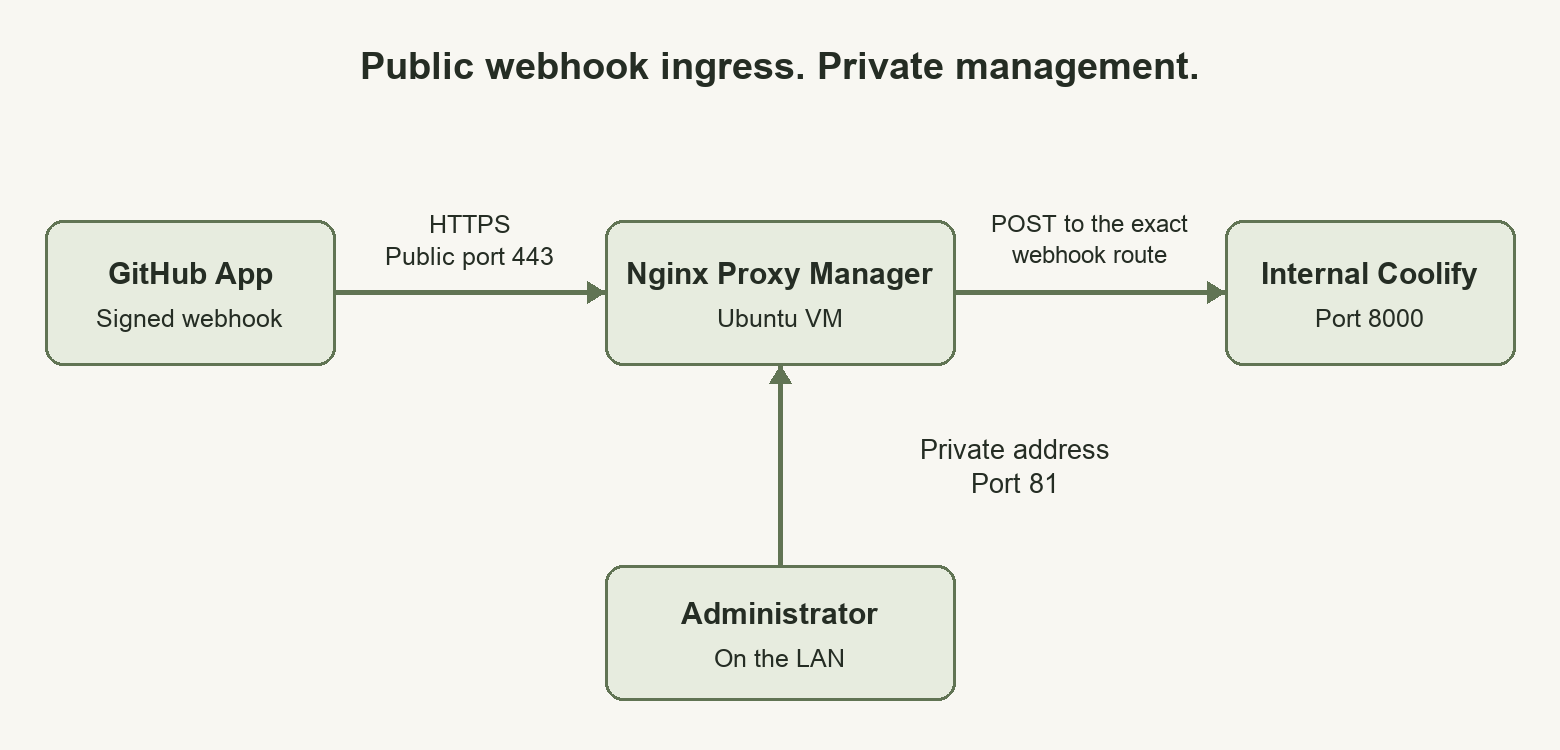
I created an Ubuntu 24.04 VM on Unraid and ran Nginx Proxy Manager inside it with Docker. The VM had a public address for HTTPS ingress and a private address for management and access to Coolify.
The initial VM had two virtual CPUs, 1 GiB of RAM, a 12 GiB disk, and 1 GiB of swap. That was the starting allocation for this webhook workload, not a sizing recommendation for a busy shared proxy.
I chose a separate VM so the public address, Docker port bindings, and firewall policy could be managed together. Docker on Unraid can also support custom networking; a VM simply gave this deployment a convenient place to maintain those settings.
Both addresses were on the existing bridged network. A public address and a private address do not create a DMZ by themselves. A separate VLAN or upstream firewall would provide another boundary beyond the guest’s own rules.
The intended exposure was small:
| Destination | Access |
|---|---|
| Public proxy address, TCP 443 | Restricted GitHub webhook route |
| Private proxy address, TCP 81 | Nginx Proxy Manager administration from the LAN |
| Private proxy address, TCP 22 | SSH administration from the LAN |
| Internal Coolify address, TCP 8000 | Existing private service; approved backend for the proxy |
| Public proxy address, TCP 80 | Closed; certificate validation used DNS |
Checking the static address before assigning it
Before using an address from the paid block, I checked the existing assignments, DNS records, and ARP responses. I also ran duplicate-address detection before applying the address to the VM. No single check proves that an address is unused, so the checks needed to agree with the network’s allocation records.
The host address and gateway must also be distinct where the provider’s configuration requires that arrangement. I used the gateway supplied for this connection. An example copied from another ISP’s setup would not establish the correct route for mine.
The private address came from DHCP. A startup helper discovered that address and used it when generating the Docker port bindings. A DHCP reservation would make the management URL more predictable; the helper did not create one.
Binding management and ingress separately
I used Nginx Proxy Manager 2.16.0 with persistent storage for its database and certificates. Its standard setup publishes the HTTP, HTTPS, and administration ports. I adapted those bindings so public HTTPS and private administration had explicit destination addresses. The volume layout follows the Nginx Proxy Manager setup documentation.
This illustrates the relevant Compose configuration:
services:
  proxy:
    image: jc21/nginx-proxy-manager:2.16.0
    restart: unless-stopped
    ports:
      - "203.0.113.11:443:443"
      - "10.20.30.20:81:81"
    volumes:
      - ./data:/data
      - ./letsencrypt:/etc/letsencrypt
Those addresses must already exist on the Docker host. The Compose file binds ports; it does not configure the host’s network interfaces.
Binding port 81 to the private address was one part of the restriction. Firewall rules also limited administration to LAN sources. The deployed management URL used HTTP on the LAN; restricting reachability does not add transport encryption to that connection.
DNS and certificates without opening port 80
I created an AWS Route 53 A record for a dedicated hostname:
github-hooks.example.com → 203.0.113.11
Nginx Proxy Manager obtained a Let’s Encrypt certificate through DNS-01 validation. That method proves control through a DNS TXT record, so this setup did not need to publish an HTTP challenge endpoint on port 80. The Let’s Encrypt challenge documentation explains the validation methods.
I created a dedicated AWS credential for certificate issuance. Its policy permitted the required ACME TXT changes in the selected hosted zone, with the read permissions needed by the DNS plugin. An IAM simulation allowed the intended TXT operation and denied an A-record change.
The broader AWS credential used to provision the DNS record stayed off the proxy VM. Nginx Proxy Manager manages renewal of the public webhook certificate using the dedicated credential.
Forwarding one Coolify route
The public hostname needed to forward this request:
POST https://github-hooks.example.com/webhooks/source/github/events
Its destination was the existing internal handler:
http://10.20.30.10:8000/webhooks/source/github/events
I used an exact location match and a catch-all rejection. The following is an adapted version of the per-host Advanced configuration used with Nginx Proxy Manager 2.16.0:
if ($host != "github-hooks.example.com") { return 444; }
client_max_body_size 25m;

location = /webhooks/source/github/events {
    if ($request_method != POST) { return 405; }
    if ($http_x_github_hook_installation_target_id != "123456") { return 403; }
    if ($http_x_hub_signature_256 = "") { return 403; }

    proxy_pass http://10.20.30.10:8000/webhooks/source/github/events;
    proxy_http_version 1.1;
    proxy_set_header Host 10.20.30.10:8000;
    proxy_set_header Connection "";
    proxy_set_header X-Forwarded-Proto https;
    proxy_set_header X-Forwarded-For $remote_addr;
    proxy_set_header X-Real-IP $remote_addr;
    proxy_set_header Authorization "";
    proxy_set_header Cookie "";
    proxy_connect_timeout 3s;
    proxy_read_timeout 10s;
    proxy_next_upstream off;
}

location / {
    return 404;
}
In the installed NPM version, declaring location / suppressed the generated catch-all proxy location. I checked the generated configuration and its behavior. That interaction should be checked again when changing NPM versions.
The App ID check and the presence of a signature header are preliminary filters. A caller can forge those headers. Coolify’s HMAC validation remains the authentication check.
GitHub signs the payload using the webhook secret and sends the signature in X-Hub-Signature-256. The proxy preserved the request body and the relevant GitHub headers so Coolify could validate them. GitHub’s signature validation documentation specifically covers preserving the payload and headers through a proxy.
The hostname had no route for the Coolify dashboard, management API, or App installation callbacks. Existing administration and installation flows continued to use their private access paths. I also configured a default TLS server to reject unconfigured hostnames.
Accounting for Docker in the firewall
The VM firewall covered both traffic addressed to the host and traffic forwarded to Docker containers.
For the iptables backend used here, Docker provides DOCKER-USER for filtering forwarded container traffic before its own acceptance rules. Docker also documents that destination NAT has already occurred at that point, which matters when matching an original public destination. See Docker’s iptables documentation.
The deployed policy allowed public HTTPS ingress, restricted private administration to LAN sources, and permitted the proxy’s LAN backend connection to the specific Coolify IP and port. Other ordinary connections from the proxy to private network destinations were rejected. Established response traffic remained allowed.
That backend restriction matters if the proxy is compromised. A route to one webhook handler should not quietly come with unrestricted access to every private service.
The rules were reapplied when Docker started. I rebooted the VM and verified the addresses, container startup, HTTPS route, and firewall behavior afterward. IPv6 was disabled for this initial deployment rather than left as an untested second ingress path.
Updating and testing the GitHub App
Once HTTPS and routing were ready, I changed the existing GitHub App’s webhook URL. I preserved its webhook secret and left certificate verification enabled. GitHub exposes these settings and delivery records through its GitHub App webhook API.
I tested both acceptance and rejection behavior:
| Check | Observed result |
|---|---|
| Unconfigured paths on the webhook hostname | HTTP 404 |
| Non-POST request to the exact endpoint | HTTP 405 |
| Incorrect App ID or missing signature | HTTP 403 from the proxy |
| Invalid HMAC with the preliminary filters satisfied | Coolify rejected the signature |
| Public access to ports 80, 81, and 22 | Unavailable |
| Proxy connection to an unrelated LAN web service | Blocked |
| Real signed GitHub redelivery | HTTP 200, expected handler response |
One detail made checking the response body essential: the installed Coolify handler returned HTTP 200 with Invalid signature. for an invalid HMAC. A green HTTP status alone would have overstated what the test proved.
For the external test, I redelivered an installation_repositories event with the added action. I had checked that the installed handler acknowledged this event without queuing an application deployment.
GitHub recorded the result on October 13, 2026, at 7:26:15 PM CDT:
Event:           installation_repositories
Action:          added
Status:          OK
HTTP status:     200
Duration:        0.2 seconds
Response body:   cool
That established actual reachability from GitHub through public DNS, TLS, the restricted proxy route, and Coolify’s signature validation. It did not exercise a push-triggered deployment or preview deployment. I did not replay historical push events, because those could initiate real application work.
Extending the proxy to other internal services
The same VM can serve additional hostnames on public port 443. Each addition needs its own deliberate configuration: a DNS record, a certificate, a proxy route, appropriate access controls, and an approved backend IP and port in the firewall.
For multiple independent Coolify instances, separate hostnames and GitHub Apps provide a direct mapping between each App and its handler. A shared App has one configured webhook URL; sending its events to several instances would require a relay with explicit routing and signature handling.
The NPM administration interface remains private as routes are added. Creating a public service hostname does not require publishing the proxy’s management page.
Saving credentials and keeping the vault private
After the proxy worked, I saved its administrator login, dedicated ACME AWS credential, VM SSH key, and operations credential bundle in Knox and Vaultwarden. Each saved value was retrieved and compared with its source. The credentials themselves are intentionally absent from this post.
I also added a LAN access path to Vaultwarden alongside its existing Tailscale URL. Tailscale Serve continued to provide private HTTPS through the tailnet; a separate LAN-bound nginx container provided HTTPS at the server’s private IP. Neither route used the public webhook proxy. Tailscale Serve documents its tailnet access model.
The LAN certificate was signed by the existing private Knox certificate authority. Client devices need to trust that public CA certificate before using the IP URL. Vaultwarden’s web vault needs a secure context for its browser cryptography, so simply opening a plain HTTP LAN port would not have completed the setup. The project explains this in its HTTPS documentation.
There was also an application-level detail: Vaultwarden 1.37.4 advertised its configured Tailscale origin in API discovery and attachment URLs. The LAN proxy replaced that literal origin in text and JSON responses so LAN clients continued using the LAN address. Binary attachments and encrypted cipher values were not decoded or transformed.
I verified LAN authentication, unlock, sync, and all 21 advertised attachment URLs using a disposable CLI profile with certificate verification enabled. That attachment check verified the URLs, not a fresh download of every attachment. The LAN certificate and private key were saved in both vaults as well, and the backup script was updated to include the LAN proxy configuration and TLS material.
The two access names still have operational differences. Passkeys remain associated with their registration hostname, and the private LAN certificate needs manual renewal after one year. The public webhook certificate has NPM-managed renewal.
The finished setup gives GitHub a small public interface and leaves day-to-day administration on private access paths. Its strongest evidence is the combination of a real signed delivery, rejected unauthorized requests, and the same behavior after a reboot. Those checks made the design reviewable beyond a successful configuration screen.