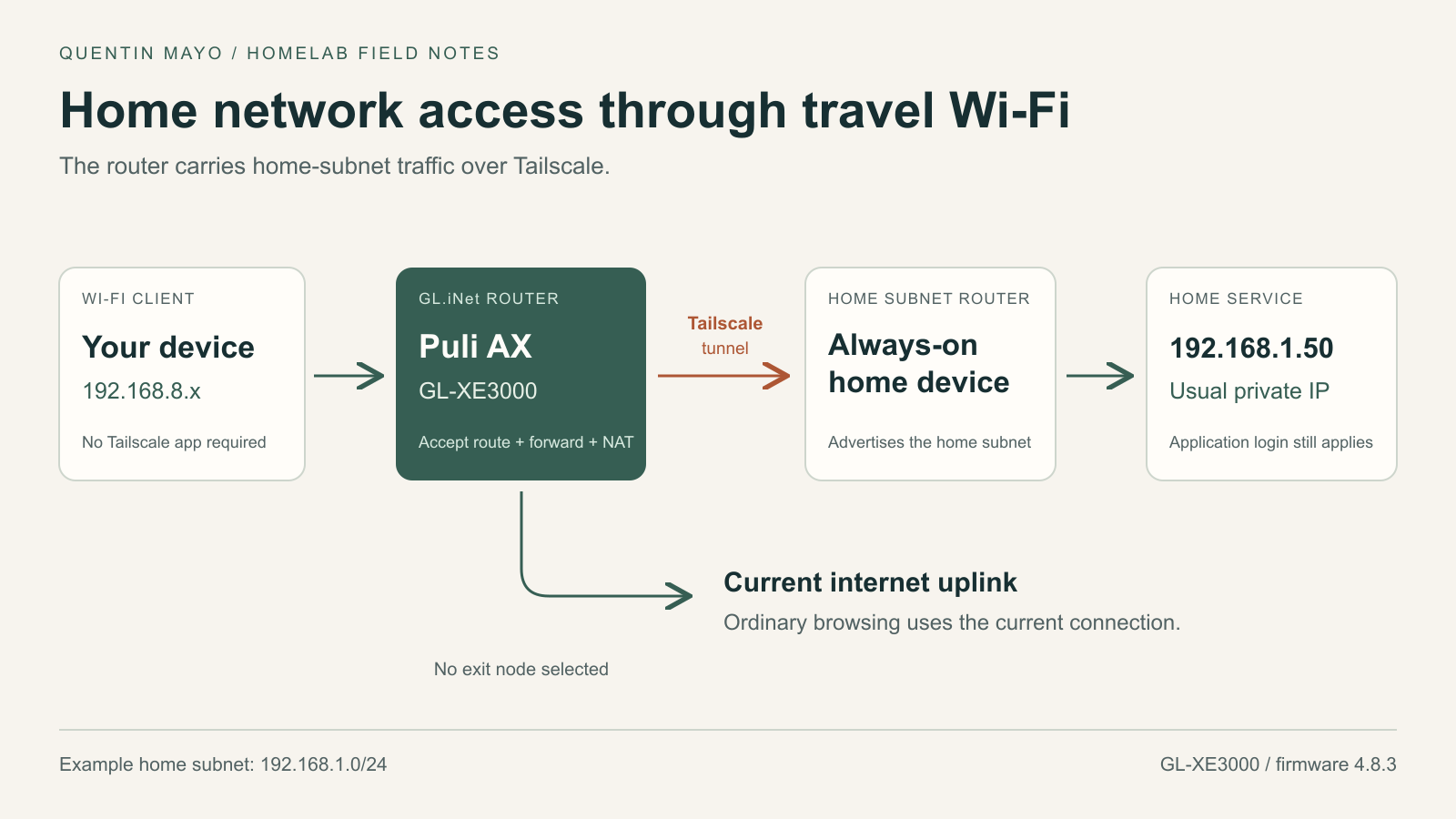
I wanted a simple behavior from my GL.iNet router: join its Wi-Fi, open a home server’s usual private IP address, and carry on. Tailscale was already working on my Mac. The next step was to make that access available through the router, including to devices that were not running Tailscale themselves.
The router was a GL.iNet Puli AX (GL-XE3000) running firmware 4.8.3, with Tailscale 1.80.3 installed. A device at home already advertised my home subnet through Tailscale. Most of the work was on the Puli AX: joining the same tailnet, accepting that route, forwarding client traffic, and working around a reconnect hook that kept interrupting authorization.
I used Codex to help inspect the configuration and run the checks. The most useful check came at the end: reaching the server through Wi-Fi while bypassing the Mac’s own Tailscale connection.
The addresses below are examples. The server address, device names, and account details have been replaced or omitted. These are configuration excerpts from this particular firmware, not a universal installer for every GL.iNet model.
The route I needed already existed at home
My home subnet router was already advertising 192.168.1.0/24. The Mac accepted that route, so it could reach a home service at an address such as http://192.168.1.50/Main.
That proved the home side worked. It did not prove that the GL.iNet router could reach the same service or forward another Wi-Fi device’s traffic to it. At that point, the Mac was providing its own VPN connection.
If you are starting without a home subnet router, that is the first piece to configure: an always-on device at home needs IP forwarding, an advertised home subnet, route approval, and an access policy that permits the intended connection. Tailscale’s subnet router documentation covers that setup.
The home and travel LANs also need compatible addressing. In this example, the GL.iNet uses 192.168.8.0/24 and home uses 192.168.1.0/24. Overlapping networks require additional planning; an IP address alone cannot tell the router which of two identical networks you mean.
Join the router to the same tailnet
Tailscale was installed on the Puli AX but disabled. Before changing anything, I backed up its Tailscale, firewall, DHCP, DNS, and reconnect-hook configuration. The backups stayed in a private directory on the router.
GL.iNet exposes Tailscale under Applications → Tailscale. Enabling it and completing the browser authorization joins the router to a tailnet. I used the same account as the Mac and the existing home subnet router. Model support and interface details are listed in GL.iNet’s Tailscale guide.
On the inspected firmware, the native startup helper used --accept-routes and --accept-dns=false. Accepting routes was the piece that let the router learn how to reach home. Once authorization completed, this check selected tailscale0 and routing table 52:
ip -4 route get 192.168.1.50

# Expected shape after the home route is available:
# 192.168.1.50 dev tailscale0 table 52 ...
I left Allow Remote Access LAN and Allow Remote Access WAN disabled. Those controls advertise networks attached to the GL.iNet for access from the tailnet. My goal was for Wi-Fi clients to initiate connections toward home, so I configured that forwarding separately.
I also left the exit node unset. The home subnet used Tailscale; ordinary internet browsing continued through the router’s current uplink.
Give Wi-Fi clients a usable return path
A route on the router is only part of the connection. A Wi-Fi client might have an address such as 192.168.8.100. The remote network needs a way to return traffic to that client.
I used masquerading on traffic leaving the GL.iNet’s Tailscale interface for the home subnet. That makes the forwarded connection use the router’s Tailscale address. It avoids having to advertise the travel LAN back into the tailnet for this access pattern.
After the native Tailscale service created its tailscale0 firewall zone, the relevant UCI settings looked like this. These commands run as root on the router, after backing up /etc/config/firewall:
uci set firewall.tailscale0.output='ACCEPT'
uci set firewall.tailscale0.forward='REJECT'
uci set firewall.tailscale0.masq='1'
uci set firewall.tailscale0.masq_dest='192.168.1.0/24'

uci set firewall.home_via_tailscale=rule
uci set firewall.home_via_tailscale.name='Home subnet via Tailscale'
uci set firewall.home_via_tailscale.src='lan'
uci set firewall.home_via_tailscale.dest='tailscale0'
uci set firewall.home_via_tailscale.dest_ip='192.168.1.0/24'
uci set firewall.home_via_tailscale.proto='all'
uci set firewall.home_via_tailscale.family='ipv4'
uci set firewall.home_via_tailscale.target='ACCEPT'

uci commit firewall
/etc/init.d/firewall reload
The destination match limits this masquerading rule to the home subnet. Tailscale also installs its own netfilter chains, so these UCI excerpts should not be treated as a complete access-control boundary. Tailnet grants or ACLs and the home application’s authentication still matter.
There is an identity tradeoff here: forwarded clients share the router’s Tailscale identity. Installing Tailscale on each device provides a different basis for device-specific policy. I verified access from the main LAN; I did not validate guest-network isolation or every Wi-Fi device. The tunnel also does not turn an HTTP application into HTTPS.
The modem kept interrupting sign-in
The first authorization looked successful briefly, then the router returned to NeedsLogin. Its Tailscale process changed, and the authorization link changed with it. Repeating the browser sign-in without understanding the restart would have sent us around the same loop.
The cellular modem was retrying its connection. In this firmware, /etc/hotplug.d/iface/19-tailscale-iface invoked gl_tailscale restart whenever an interface came up, excluding loopback. Those modem events repeatedly restarted Tailscale during authorization.
For this configuration, WAN subnet advertising and exit-node use were both disabled. I backed up the hook and added this guard after its existing loopback check, before the restart call:
# Keep an active client running for this subnet-access configuration.
if pidof tailscaled >/dev/null 2>&1 &&
    [ "$(uci -q get tailscale.settings.wan_enabled)" != "1" ] &&
    [ -z "$(uci -q get tailscale.settings.exit_node_ip)" ]; then
    exit 0
fi
Tailscale can follow network changes without restarting the daemon for every modem retry. The guard preserves the existing restart path when the daemon is absent, WAN advertising is enabled, or an exit node is configured. I checked the script’s syntax and simulated the modem’s interface-up event; the daemon’s process ID stayed the same.
A fresh authorization then completed, and the router saved its authenticated state. This is a local workaround for behavior observed on this device and firmware. I would inspect another version’s hook before applying it, and check it again after a firmware update, which may replace the file.
Test through the router, not the Mac’s VPN
Opening the server in a browser was an easy false-positive test because the Mac already had its own working Tailscale route. I needed to force the request through the Wi-Fi interface and the GL.iNet gateway.
On this Mac, the Wi-Fi interface was en0. After confirming the interface and its gateway, I used the equivalent of:
route -n get -ifscope en0 192.168.1.50

curl -4 --interface en0 --noproxy '*' \
  --connect-timeout 6 --max-time 15 \
  -L -sS -o /dev/null -w 'HTTP %{http_code}\n' \
  http://192.168.1.50/Main
Before the router was connected, the Wi-Fi-only request timed out. After setup, it followed the service’s redirect and returned HTTP 200 from the home server’s login page. Reaching that page established connectivity; it did not bypass the application’s login.
I also checked ordinary internet access through the same Wi-Fi interface. Then I restarted the router’s Tailscale service with its native helper, confirmed it returned to Running with the home route installed, and repeated the Wi-Fi-only request successfully. Tailscale was enabled at boot. This was a service-restart test, not a full router power-cycle test.
The result I wanted
Joining the Puli AX’s main Wi-Fi now gives me a path to home services at their usual private addresses. The home subnet router provides the remote route, and the Puli AX handles the connection and forwarding for its clients.
The useful lesson was to test the device that is supposed to provide the capability. A working VPN on my Mac could have hidden an incomplete router setup. Forcing the request through Wi-Fi made the result clear: the router was doing the work.